
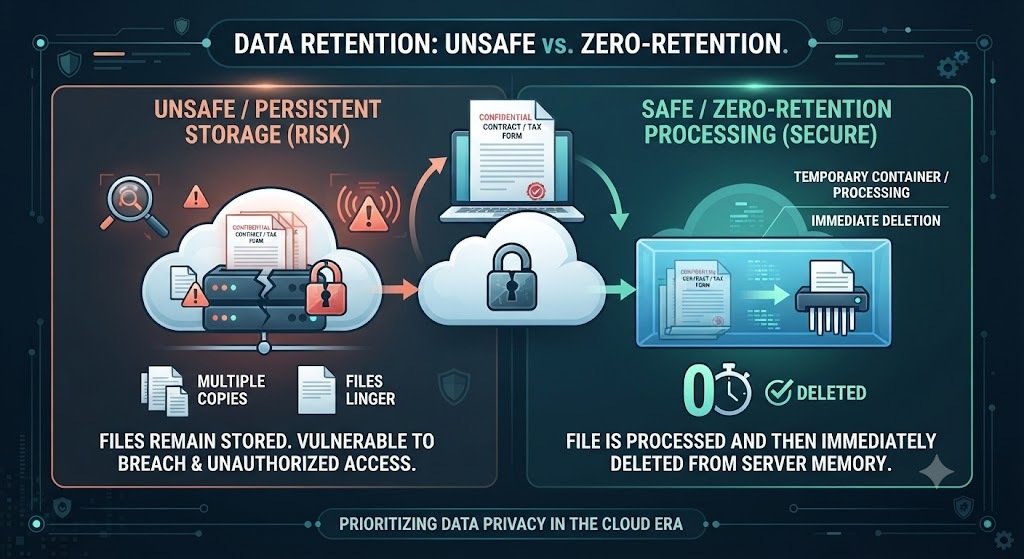
Why online PDF tools should never store your files comes down to a question most people never think to ask until it’s too late: once you hit upload, where does that document actually go, and who can see it after you’ve closed the tab? Every day, contracts, medical records, tax returns, signed NDAs, and confidential client files get dragged into a free online converter without a second thought — because the tool is fast, the result looks fine, and the person uploading has no reason to assume anything’s wrong. From a legal and data-protection standpoint, that assumption is exactly the problem. This guide walks through what actually happens to a file the moment you upload it, why server-side storage creates real liability — for you, not just the tool provider — and what a genuinely privacy-first PDF tool needs to get right. If you’re already thinking about this from a compliance angle, it pairs directly with my breakdown of how to draft a privacy policy that actually complies with India’s DPDP Act 2023, since the same principles governing what you disclose to your own users apply to what you disclose to the tools you use.
Quick Answer
Why shouldn’t online PDF tools store your files? Every stored file becomes a liability in three ways: it’s a breach target if the provider’s servers are compromised, it’s discoverable in legal proceedings if the provider is subpoenaed, and it may violate confidentiality obligations you owe to clients, patients, or employers if you didn’t have authority to share that document with a third party in the first place.
Is it actually illegal to upload confidential documents to a PDF tool that stores files? Not automatically illegal, but it can breach contractual confidentiality clauses, professional privilege (attorney-client, doctor-patient), or data protection law (GDPR, CCPA) if the document contains personal data and the tool provider doesn’t meet the legal requirements for processing it.
What does “zero data retention” actually mean? It means a tool processes your file — reads it, converts it, edits it — without permanently saving a copy afterward. The file typically exists only in temporary, isolated processing memory and is deleted immediately once the task completes.
How can I tell if a PDF tool actually deletes my files? Check the provider’s privacy policy for explicit language about retention periods, look for “transient processing” or “zero data retention” claims specifically, and be skeptical of any tool that requires an account or offers to “save your file history,” since that implies storage by design.
What Actually Happens When You Upload A PDF
Most people picture “uploading a file to a website” as something abstract and safe. In reality, it’s a concrete, traceable event: your document travels over the internet to a server somewhere, sits in that server’s memory or disk while the requested task runs, and then either gets deleted or doesn’t. That last part — deleted or doesn’t — is the entire question this article is about, and it’s a decision the tool provider makes, not something you can verify just by looking at the interface.
Server-side processing itself isn’t inherently risky. Converting a Word document to PDF, merging multiple files, or running OCR on a scanned page all genuinely require the file to be processed somewhere with enough computing power to do the job — your phone or laptop often can’t do this as efficiently as a server can, particularly for tasks like OCR on scanned documents or converting complex file formats. The risk isn’t that your file touches a server. The risk is what happens to it after the job is done.
Why Online PDF Tools Should Never Store Your Files: The Legal Exposure Nobody Reads The Terms Of Service For
Here’s where this stops being a hypothetical privacy concern and becomes a genuine question of legal exposure, particularly for anyone handling documents on behalf of someone else.
Confidentiality and professional privilege. If you’re a lawyer uploading a client contract, a healthcare provider uploading patient records, an HR professional uploading an employee’s personnel file, or an accountant uploading tax documents, you likely owe a duty of confidentiality to the person that document belongs to. Uploading that file to a third-party tool that retains a copy on its own servers — servers you have no visibility into, no contract with beyond a generic terms-of-service page, and no ability to audit — can constitute an unauthorized disclosure, regardless of whether anything ever goes wrong. The breach, in a legal sense, can be the disclosure itself, not just a subsequent leak. This is exactly the kind of gap I cover in how to draft a contract that actually protects you — most confidentiality clauses are written assuming the risk comes from a person, not from a tool the person casually used without thinking about it.
Data protection law. Under GDPR in the EU/UK and similar frameworks like the CCPA in California and India’s own DPDP Act, personal data has to be processed lawfully, and organizations that hand personal data to a third-party processor remain responsible for what that processor does with it. If a free PDF tool stores uploaded files indefinitely, retains them for “service improvement,” or doesn’t have adequate security controls, the business or individual who uploaded that data can face exposure — not just the tool provider. This is precisely why data protection frameworks increasingly expect organizations to conduct real due diligence on the third-party tools their staff use, rather than assuming “it’s just a PDF converter” puts it outside the scope of data protection obligations. It’s also worth understanding the distinction between what a provider’s Terms of Service governs versus what its Privacy Policy actually commits to — I cover that difference in detail in Terms of Service vs Privacy Policy: What’s the Difference and Why You Need Both, since most people conflate the two and miss exactly the retention language that matters here.
Breach liability and discoverability. A stored file is a stored risk. If a tool provider’s servers are ever breached, every retained file becomes exposed data — and unlike a breach at your own organization, you likely won’t even know it happened until it’s already public. Retained files can also become discoverable in litigation involving the tool provider itself, a scenario most people uploading a routine PDF never consider, but one that becomes very real the moment a provider is served with a subpoena or data request covering its stored user files.
None of this requires anything to have gone wrong yet. The exposure exists the moment the file is stored — which is exactly why the right question to ask about any PDF tool isn’t “has this company ever had a breach,” it’s “does this company even have anything to breach.”
What “Zero Data Retention” Should Actually Mean
Not every provider that claims to care about privacy backs it up the same way, so it’s worth knowing what a genuinely strong privacy architecture looks like versus a marketing claim with no substance behind it.
- Transient, isolated processing — the file exists only in a temporary processing environment created specifically for that task, and nowhere else, rather than being written to a persistent database or file storage system.
- Immediate deletion after task completion — not “deleted after 30 days,” not “deleted unless you create an account,” but deleted as soon as the conversion, merge, split, or edit is done.
- No account requirement for basic tools — a tool that lets you merge, split, or compress a PDF without requiring sign-up has structurally less reason to retain your data long-term, since there’s no user profile to attach a file history to in the first place.
- Clear, specific privacy policy language — vague statements like “we take your privacy seriously” mean nothing without a concrete explanation of what happens to uploaded files, for how long, and under what conditions, if any, they’re retained.
This is the actual architecture behind how VelaPDF is built: files are processed in transient, isolated containers and deleted immediately after the task completes, with no requirement to create an account just to use a core tool. That’s a meaningful design decision, not a footnote — it’s the difference between a tool that could become a liability months after you’ve forgotten you used it, and one that structurally can’t, because there’s nothing left to leak once the job is done.
A Practical Checklist Before You Upload Anything Sensitive
- Read the specific retention language in the privacy policy — not the marketing page, the actual policy — and look for explicit statements about how long files are kept and whether that period is zero.
- Avoid tools that require an account for a simple one-off task — if you’re merging two PDFs once, there’s no legitimate reason a provider needs to create a persistent profile tied to your files.
- Check whether the tool works entirely in-browser or on a server, and understand that both can be safe, but only if the server-side option has genuine zero-retention practices — client-side, in-browser processing (where technically supported) never sends your file anywhere at all.
- Be more cautious with documents you don’t have clear authority to share — client files, patient records, and anything covered by a confidentiality agreement deserve a stricter standard than your own personal documents.
- Prefer tools that state their processing architecture plainly, rather than ones that only make vague trust claims without technical specifics.
If your work regularly involves converting scanned or handwritten documents, this same due-diligence habit applies directly — our guide on how OCR actually works and what happens to a document during that process is worth reading alongside this one, since OCR tools handle some of the most sensitive document types (ID scans, signed contracts, medical forms) by definition.
Why This Matters Beyond One Upload
The broader pattern worth internalizing here is that privacy risk in document tools isn’t really about any single upload — it’s cumulative, and it’s the core reason why online PDF tools should never store your files as a matter of default architecture, not just policy language. Someone who uses a file-storing converter once a month, across years, across dozens of confidential documents, has effectively built an unauthorized, unaudited archive of sensitive material sitting on a server they don’t control and likely can’t even name a provider for after the fact. That’s a genuinely different risk profile than a single mistake, and it’s exactly why the right habit is choosing tools with zero data retention as a default, rather than trying to remember which specific documents were “sensitive enough” to warrant extra caution each time.
Frequently Asked Questions: Why Online PDF Tools Should Never Store Your Files
Do free online PDF tools always store your files? Not always, but many do, either to improve their service, build user profiles, or simply because their infrastructure wasn’t designed with deletion as a priority. The only way to know is to check the specific privacy policy language for a given tool rather than assuming.
Is uploading a PDF to a converter the same as sending it by email? No — email typically goes directly to a known recipient under an existing relationship, while uploading to a third-party tool sends your file to an unknown-to-you server infrastructure governed only by that provider’s terms of service and privacy policy, which most users never read closely.
Can I be held responsible if a PDF tool I used leaks a client’s document? Potentially, yes, particularly if you had a confidentiality obligation to that client and didn’t have their consent to share the document with a third-party processor. Liability in these situations often depends on your own duty of care in selecting the tool, not just the tool provider’s conduct.
What’s the safest way to convert or edit a sensitive PDF? Choose a tool with explicit zero data retention practices, avoid unnecessary account creation, and where genuinely sensitive material is involved, verify the provider’s privacy policy states files are deleted immediately after processing rather than retained for any period.
Does VelaPDF store uploaded files? No — VelaPDF processes files in transient, isolated containers that are deleted immediately after the task completes, with no persistent storage of uploaded documents. You can review the specifics on the VelaPDF privacy policy and About pages.
Ready to convert, merge, or edit a document without adding it to someone else’s server permanently? Explore VelaPDF’s full suite of PDF tools — built on zero data retention by default, not as an afterthought.
This article is for general informational purposes only and does not constitute legal advice. Data protection obligations vary by jurisdiction, industry, and the nature of the documents involved. If you handle confidential, privileged, or regulated personal data professionally, consult a qualified attorney or data protection officer about your specific compliance obligations before selecting any third-party document processing tool.